Spring注解学习_组件注册2_@ComponentScan
以前想要扫描包下的组件,我们需要在xml中作如下配置:
<!-- 包扫描、只要标注了@Controller、@Service、@Repository,@Component -->
<context:component-scan base-package="com.study" use-default-filters="false"></context:component-scan>
现在直接在主配置文件上标注@ComponentScan就行了
@ComponentScan(value=“指定要扫描的包的路径”)
@Configuration
@ComponentScan("com.study")
public class MainConfig {
    //给容器中注册一个bean,其类型为返回值类型,id为方法名
    @Bean
    public Person person(){
        return new Person("小米",12);
    }
    @Bean
    public Person person2(){
        Person person = new Person();
        person.setName("红米");
        person.setAge(44);
        return person;
    }
    @Bean("改名") //Bean注解中可设置name,value字段
    public Person person3(){
        return new Person("黑米",12);
    }
}
MainTest中打印一下:
ApplicationContext context = new AnnotationConfigApplicationContext(MainConfig.class);
String[] beanDefinitionNames = context.getBeanDefinitionNames();
for (String beanDefinitionName : beanDefinitionNames) {
    System.out.println(beanDefinitionName);
}
结果:
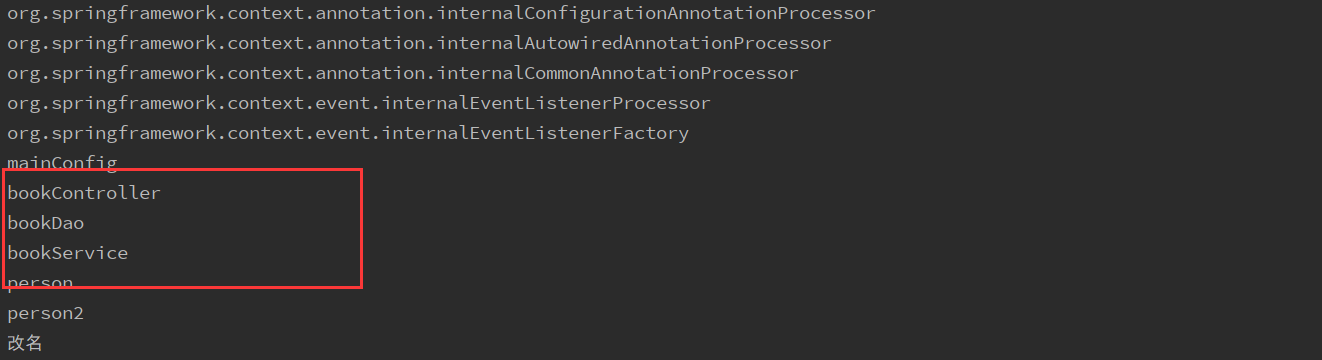
在ComponentScan时,可以指定排除的组件:
@Configuration
@ComponentScan(value = "com.study",excludeFilters = {
        @ComponentScan.Filter(classes = {Controller.class, Service.class})
})
public class MainConfig {
    ...
}
也可以指定仅包含组件:
@Configuration
@ComponentScan(value = "com.study",includeFilters = {
        @ComponentScan.Filter(
                classes = {Controller.class, Repository.class},
                type = FilterType.ANNOTATION),		//按照注解类型过滤
        @ComponentScan.Filter(
                type = FilterType.ASSIGNABLE_TYPE,	//按照类过滤
                classes = {BookService.class}
        )
})
public class MainConfig {
    ...
}
转载请注明来源,欢迎对文章中的引用来源进行考证,欢迎指出任何有错误或不够清晰的表达,邮件至 708801794@qq.com
文章标题:Spring注解学习_组件注册2_@ComponentScan
文章字数:285
本文作者:梅罢葛
发布时间:2020-03-29, 13:22:00
最后更新:2020-03-29, 14:33:07
原始链接:https://qiurungeng.github.io/2020/03/29/Spring%E6%B3%A8%E8%A7%A3%E5%AD%A6%E4%B9%A0-%E7%BB%84%E4%BB%B6%E6%B3%A8%E5%86%8C-ComponentScan/